Requirements
| WordPress | 6.5 or newer (tested up to 7.1) |
|---|---|
| PHP on your server | 7.2 or newer |
| Checks against | PHP 8.0, 8.1, 8.2, 8.3, 8.4 and 8.5 |
| Current version | 1.0.0 |
| Licence | GPLv2 or later |
Overview
Your host wants you on a newer PHP version. Will your site survive the switch?
Airworthy reads the code of every installed plugin and of your theme (on multisite: every network-enabled theme) and checks it against the PHP version you pick, from PHP 8.0 to PHP 8.5. It also looks each plugin up on WordPress.org to see whether it is still maintained. You get one clear verdict per plugin and theme, before you touch your server settings.
What you get
- A verdict for every plugin and theme. Blocker, Unknown, Suppressed, Guarded, Warnings or Ready, each with one plain sentence explaining what it means for you.
- Fewer false alarms. Many plugins carry old code that only runs on old PHP versions, behind a version check. Airworthy recognises those checks and marks that code as guarded instead of broken. In our test of the 30 most popular plugins, this cut the plugins flagged as broken from 4 to the 2 with real bugs.
- Maintenance signals from WordPress.org. Plugins that were closed (removed from the directory), not updated in two years, not tested with recent WordPress versions, or that need a newer PHP version than you picked are called out.
- The details when you want them. Every finding shows the file, the line and what changed in PHP. Filter by verdict, rescan one plugin after an update, or download everything as a CSV file for your developer or host.
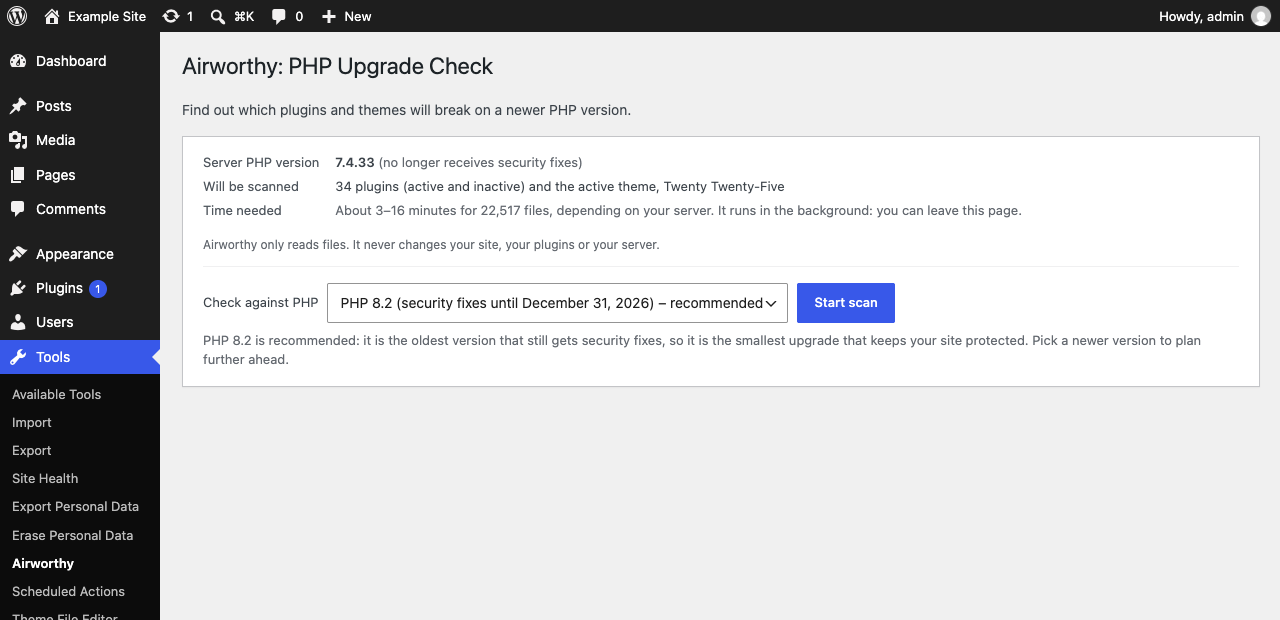
- Sensible default. Airworthy recommends the oldest PHP version that still gets security fixes: the smallest upgrade that keeps your site protected. It shows every version's support dates.
- Safe on any host. Scans run in the background in short batches, so they never time out, and they watch memory use. You can leave the page while a scan runs. Nothing is changed on your site.
- Multisite ready. On a network, Airworthy is activated network-wide and lives under Network Admin > Settings.
WP-CLI
Everything on the admin screen also works from the terminal:
wp airworthy scan --target=8.4checks every plugin and theme and prints the results.wp airworthy scan --only=my-plugin --fail-on=blockerexits with code 1 if anything would break, for CI.wp airworthy results --verdict=blocker,unknownshows what needs attention.wp airworthy issues <slug>lists one plugin's findings with file and line.wp airworthy rescan <slug>,wp airworthy export --file=report.csv,wp airworthy status,wp airworthy cancelandwp airworthy targetsdo what their names say.
Privacy
This plugin reads your plugin and theme files on your own server; it never runs them and never sends them anywhere.
To show whether a plugin is still maintained, it looks up each plugin's slug (its folder name) in the public WordPress.org plugin directory (api.wordpress.org). Nothing else is sent: not your site's address (the requests use their own "Airworthy" user agent instead of WordPress's default, which includes your site URL), not your plugin list, not your PHP version. Answers are cached for 24 hours.
Airworthy sets no cookies, adds nothing to your site's front end, and has no tracking, account or sign-up.
Source code and build
The full, human-readable source code is public at https://github.com/damien-cork-boi/airworthy.
The scan engine is built from open-source libraries: PHP_CodeSniffer, PHPCompatibility and PHPCSUtils. Other plugins, or your own tools, may load their own copies of these, possibly different versions. To keep the copies apart, the release build runs them through PHP-Scoper (https://github.com/humbug/php-scoper), which moves their code into Airworthy's own Airworthy\Vendor namespace. The scoped code in the vendor/ folder is ordinary, readable PHP; only the namespace names change.
To rebuild the plugin from source, clone the repository and run bin/build.sh. It installs the exact library versions pinned in plugin/composer.lock, scopes them, checks the result and writes dist/airworthy.zip. docs/ENGINE.md explains each step.
Action Scheduler is bundled unscoped, as WooCommerce and other plugins do, because it is designed to share one copy between all plugins that include it.
Bundled libraries and licences
Airworthy's own code is GPLv2 or later. It bundles:
- PHP_CodeSniffer 4.0.4: BSD-3-Clause. https://github.com/PHPCSStandards/PHP_CodeSniffer
- PHPCompatibility 10.0.0-alpha2: LGPL-3.0-or-later. https://github.com/PHPCompatibility/PHPCompatibility
- PHPCompatibilityParagonie 2.0.0-alpha2: LGPL-3.0-or-later. https://github.com/PHPCompatibility/PHPCompatibilityParagonie
- PHPCompatibilityWP 3.0.0-alpha2: LGPL-3.0-or-later. https://github.com/PHPCompatibility/PHPCompatibilityWP
- PHPCSUtils 1.2.3: LGPL-3.0-or-later. https://github.com/PHPCSStandards/PHPCSUtils
- Action Scheduler 3.9.3: GPL-3.0-or-later. https://github.com/woocommerce/action-scheduler
Because Action Scheduler is GPLv3 and the PHPCompatibility libraries are LGPLv3, the plugin as distributed, taken as a whole, is covered by the GPL version 3. Each library's licence file is included in its folder. A software bill of materials (sbom.cdx.json, CycloneDX format) lists every bundled component and version.
Installation
- In your WordPress admin, go to Plugins > Add New, search for "Airworthy" and click Install Now, then Activate. Or upload
airworthy.zipunder Plugins > Add New > Upload Plugin. - Go to Tools > Airworthy (on multisite: Network Admin > Settings > Airworthy).
- Pick the PHP version you want to move to (the recommended one is preselected) and click Start scan.
- Wait for the scan to finish, or come back later. You get a notice when the results are ready.
Only administrators can run scans and see results (on multisite, network administrators).
To remove everything Airworthy stored (its three database tables, settings and scheduled jobs), delete the plugin from the Plugins screen.
Frequently asked questions
Does Airworthy change my PHP version or my site?
No. It only reads files and reports. You change the PHP version yourself, usually in your hosting control panel, when you're ready.
What can a static scan catch, and what can't it?
Airworthy reads the code without running it. That catches most PHP upgrade problems: functions, classes and constants that were removed, changed syntax, removed extensions, and new reserved words. It sees every file, including code paths your visitors rarely trigger.
It can't see what only happens when code runs. For example: code that builds function names at run time, behaviour that depends on your data or settings, and problems in files a plugin downloads or generates later. Some newer PHP changes (such as a few PHP 8.1 and 8.5 deprecations) can't be detected reliably by reading code yet. So a "Ready" verdict means no problems were found, not a guarantee. Test on a staging copy of your site, and keep a backup, before you switch.
What does each verdict mean?
- Blocker: needs attention before you upgrade. Some of its code will not work on the PHP version you picked, or it needs a newer PHP version than that.
- Unknown: some files could not be checked, so there's no verdict yet. The details list which files and why.
- Suppressed: the author marked some code as intentionally left as-is. Most of the time that's fine, but worth confirming with them.
- Guarded: it contains code for old PHP versions, but only runs it on those versions. Nothing to do.
- Warnings: it works, but uses features that are being phased out. Nothing breaks now; the author should update before a future PHP version.
- Ready: nothing that would break on the PHP version you picked.
What is sent to WordPress.org?
Only each plugin's slug (its folder name), to look up its public directory entry. Not your site address, not your plugin list, not your PHP version. See Privacy above. Themes aren't looked up.
A plugin shows as Blocker. What should I do?
Update it first, if an update is available; then rescan just that plugin with the Rescan button. If it's still a Blocker, open the details, download the CSV and send it to the plugin's author or your developer. If the plugin was closed on WordPress.org, look for a maintained replacement.
Will a scan slow down my site?
Scans run in the background in short batches of about 20 seconds, using WordPress's own scheduled tasks (Action Scheduler). Visitors aren't affected. A typical site with 20–30 plugins takes a few minutes; Airworthy estimates the time before you start.
Which PHP versions can I check against?
PHP 8.0, 8.1, 8.2, 8.3, 8.4 and 8.5. Versions that no longer get security fixes are marked as ended; you can still check them, but results for them are less precise.
Why do I now see Tools > Scheduled Actions?
That menu comes from Action Scheduler, the background-job library Airworthy uses (WooCommerce uses the same one). It's harmless, and lists Airworthy's jobs under the "airworthy" group.
How do I report a security problem?
Email security@airworthywp.com. Please don't post it in the public support forum. See SECURITY.md in the source repository for how reports are handled.
Screenshots